Spotify Slayer
Spotify is for finding music.
This is for playing it out.
Browse your playlists, tag every track by energy and busyness, build a set with a visual arc, get the actual files, and export to rekordbox or Traktor.
Free and open source · Runs on your machine · No account, no signup, no hosted version
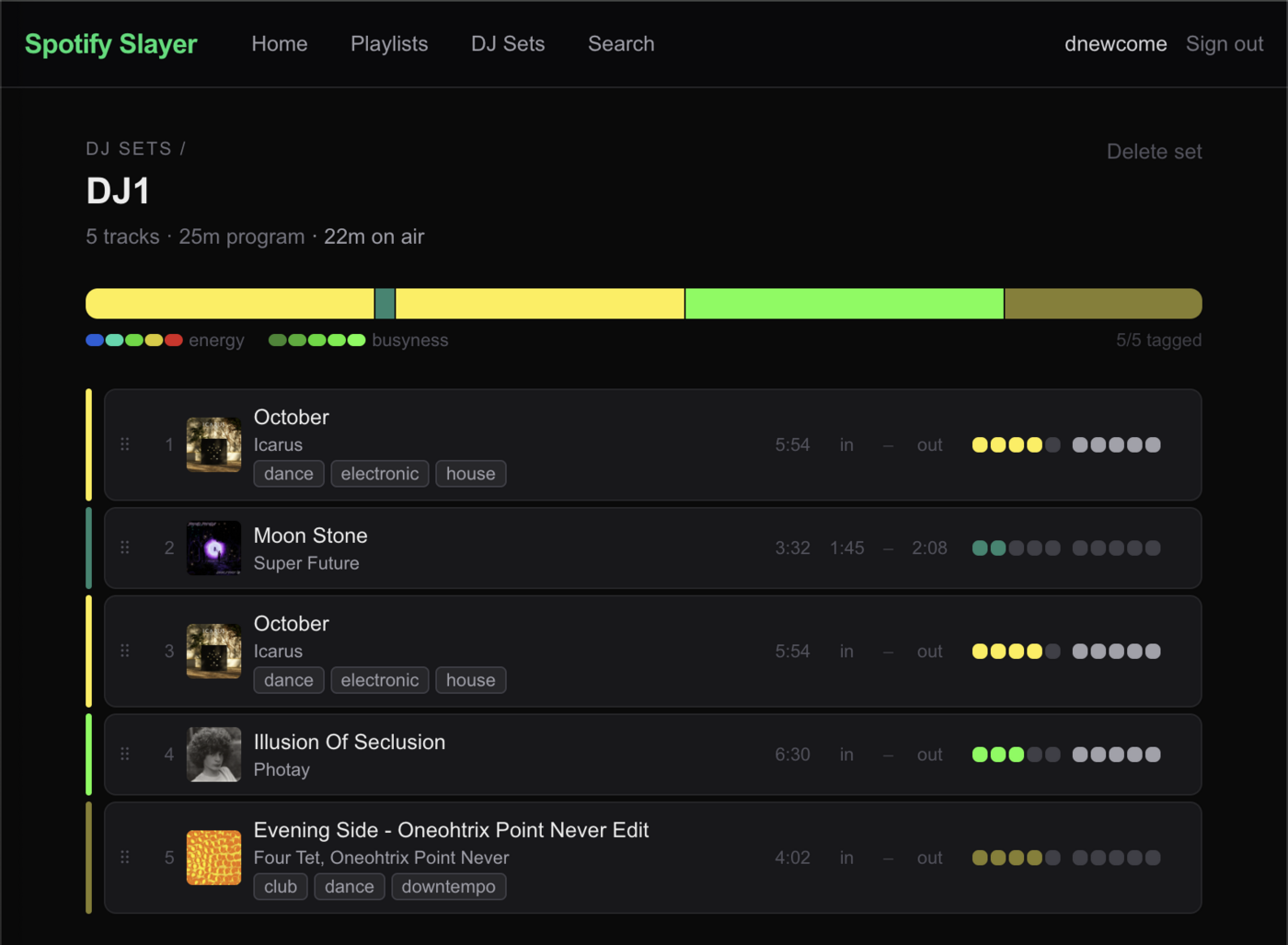
A set in progress — the arc bar shows its energy shape, sized by each track's active region.
The problem
Spotify is a great place to find records and a terrible place to prep a set. Tracks you add get buried in Liked Songs. There's no way to rate one by energy, mark where you'd bring it in, see the shape of an hour, or do anything about the fact that you can't play a stream at a gig.
Spotify Slayer is a second interface onto your own Spotify account, built for the part of the job that happens after you find the record.
What it does
Sets with a shape
Drag-and-drop ordering, in/out points per track, and program vs. on-air duration. The arc bar renders your set's energy as a strip, each block sized by how long that track actually plays.
Energy and busyness
Rate every track 1–5 on two axes, plus freeform labels like "opener" or "floor filler." Ratings live in your library and follow the track into every set. Genres arrive automatically from MusicBrainz.
Get the actual files
Search Soulseek from any track row and pull FLAC or MP3, sorted by quality — with a YouTube-sourced fallback for what Soulseek doesn't have. Downloads are tagged and filed automatically.
Onto the USB stick
rekordbox XML with your in/out points as memory cues, m3u8 for Traktor, or a plain numbered folder you can drag straight onto a stick and browse on the player.
Running it
There is no hosted version, and that's deliberate. The half of this app that matters most — finding files, tagging them, filing them, building the folder you carry to a gig — needs a real disk and real binaries on your own machine. A cloud instance couldn't do any of it. So you run it yourself, with your own Spotify credentials, and nothing you do here passes through anyone else's server.
-
Make a Spotify app
Create one at developer.spotify.com and add
http://127.0.0.1:3000/api/auth/callback/spotifyas a redirect URI. It takes about a minute, needs no review or approval, and you are the only user of it. (Use127.0.0.1, notlocalhost— Spotify rejects the latter.) -
Clone and configure
# grab it
git clone https://github.com/audiodestrukt/spotify-slayer
cd spotify-slayer && npm install

# .env
SPOTIFY_CLIENT_ID=your_client_id
SPOTIFY_CLIENT_SECRET=your_client_secret
NEXTAUTH_URL=http://127.0.0.1:3000
NEXTAUTH_SECRET=any_random_string
MUSIC_DIR=/home/you/Music/dj-library
-
Run it
npm run dev # then open http://127.0.0.1:3000Set building and tagging work immediately. File acquisition needs a couple of extra pieces — see below.
What you need
- A Spotify account — required. Premium only if you want the in-browser player; everything else works on free.
- Node.js — the app is Next.js 16.
- ffmpeg — embeds tags and files each download into your library. Acquisition only.
- slskd — a Soulseek daemon with a REST API. Optional, but it's the best source for dance music in FLAC.
- spotdl — optional YouTube-sourced fallback for tracks Soulseek can't find.
Honest notes
- Your data stays put. Sets and tags live in your browser's localStorage. There's no database and no account beyond Spotify's own OAuth.
- It's built around one person's workflow — mine — and it shows in places. It's a real tool I use, not a product.
- Bring your own files. The app helps you find and organize music you're entitled to have. What you download is on you.
- Linux-first. It's developed on Linux and should be fine on macOS. Windows is untested.